Karting Onboard Video: What It Shows and How to Review It
What onboard video shows you in karting and what it doesn't, where I put the camera, and the order I review my laps in after every session.
- Without video and data you are driving blind. You are not exactly sure of what you have to improve, and then the session is a bit of a useless session.
- Video shows you the lines, the hands and the kart. I check my lines first, then my steering technique, the moment I hit the throttle, how much track I use on entry and how the kart behaves.
- Video gives you a perception, data gives you the real number. Line differences of 30, 40, 50 centimeters you can’t really see on video.
- The camera has to see the inside of the corners. That’s why I like it on the helmet, inside the visor.
- Start from the video when you learn a new track. Once you know the track very well, the data starts to be more useful.
- Watch yourself as if you were watching some other driver. Honest and objective, with the ego left to a side.
- Other drivers’ onboards give you lines, not braking points. Use them as a baseline and then build your own.
- Why should you record every session?
- What does onboard video show you?
- Can the video show where you are looking?
- What does onboard video not show you?
- Where should you put the camera?
- What do you need, and what is the routine?
- How do you review an onboard after a session?
- Video or data first, when you are short on time?
- How do you watch your own onboard honestly?
- Should you watch other drivers’ onboards?
- Can you use onboard video in races?
- What if you watch it and you still can’t see the problem?
- Frequently asked questions
You have the camera on every session. But do you know what to look for when you press play?
A lot of drivers watch their onboard like a movie. They watch the lap, it looks fine, and they close the laptop. So let me tell you what I look for, what the video can’t tell you, and where I put the camera.
Why should you record every session?
Think about it. If you’re driving without your onboard video and without your telemetry, you’re basically driving blind. You’re not exactly sure of what you have to improve. And if you drive without being aware of where you have to improve, I think it’s just a useless session.
Back in the days we didn’t really rely on video or on data. We used to rely a lot on feeling. That doesn’t mean it was the right way.
Onboard cameras didn’t exist until the early 2000s, I believe, so you couldn’t quite rewatch your laps. Drivers around me started using them by 2010 or 2011, and I beat myself for not having done the same. I’d just use it occasionally. I’m not really sure why, and I feel a big regret for not having been consistent about it.
Because without it, you rely on your mechanic’s pair of eyes. And listen, a really technical and experienced mechanic still plays a huge role in finding lap time. But his feedback may be biased by a single mistake you made in one corner.
Say you pick up the throttle a bit too early once and you go on the grass on exit. The first thing your mechanic tells you is “stay tight on exit”. But then you look at every lap from the onboard, and you see that on average you’re using too little track on exit, with just a bit of kerb, while your teammates always get to the limit of dropping a wheel off it. The video proved the correct point.
Every major tennis player rewatches match footage with his coach. Soccer teams analyse game tape. There’s a reason why they do it.
What does onboard video show you?
The first thing is the lines. The onboard video is going to show you the lines really well. So when I open a video, first I want to see if I’m taking the right lines.
If the lines are right, I look at my hands. Am I steering correctly? Am I pushing nicely with my outside hand, or am I pulling with my inside hand?
Then the moment I hit the throttle. Is it before the apex, at the apex or after the apex? On the video you get an idea of it. The real value you get from the data.
Then how much track I’m using, specifically on the entries. How close to the limit am I on entry?
And then the kart behaviour. Am I using too much steering input and I have understeer? Do I get a massive snap oversteer as soon as I turn in? Am I not able to stop the kart efficiently? All of this you can see from the video.
And you don’t need to feel anything for that. When you’re watching an onboard video, you can already sense what the driver is doing. You don’t have the G-forces, you don’t have the vibrations, but your eyes are enough to break down what’s going well and what isn’t.
I like spending a lot of time looking at my data and my onboard. It helps me find lap time in my driving, and it also helps me find possible issues to fix on the chassis and the engine.
Can the video show where you are looking?
Yes, if the camera is on the helmet.
I watch my drivers’ onboard videos all the time. And from the way the camera gets tilted, I can spot very well whether a driver is looking nicely further up, or he is looking too close, almost at the ground right in front of him.
When I spot that a driver is not looking as far ahead as he should, I immediately tell him. It’s not easy to fix, because it’s something drivers do by instinct. It’s a common negative habit that most drivers have at the beginning.
But you have to look further up ahead anyway, if you want to set faster laps and stay out of trouble. I go deeper on that in how to stop crashing in karting.
What does onboard video not show you?
Here is the limit of it. The data gives you the real number, whereas the video gives you more of a perception.
On the data you can see small line differences of 30, 40, 50 centimeters. On the video you can’t really see them. Unless it’s an obvious line mistake, you will rarely see a major line mistake on the video.
Same thing when you miss an apex. The data tells you exactly how many meters more you made in that corner. From the video you can just have an assumption.
The full picture of the corner is not that clear either. From an onboard you can sort of sense how much track you’re using, but you don’t see the whole arc. For that a drone is better, and I explain it in how a drone helps you learn a track faster.
And the data shows more pragmatically where you’re losing the time. So when I want the exact corner and the exact number, I open the data. How I read it is in what I look at first in AiM Race Studio 3.
Where should you put the camera?
First of all, you should always have a camera of your own. A coach most of the time comes with his own cameras, but maybe his one is broken, or it’s out of battery. And you need it anyway for the days when you don’t have a coach.
You can get yourself something like an Insta360 GO 3S, or simply a GoPro. But you need to be able to see the inside of the corners very well.
So think about where the camera sits. When the camera is on the left hand side, mostly you can’t see the apexes of the right handers really well. That’s why I like to put the camera on the helmet, inside the visor. A small camera that you clip on your visor works really well for that.
And as I said, from the helmet I can also tell where you’re looking.
I want your video quality to be really good, so that you have an idea of what to improve.
What do you need, and what is the routine?
Setting everything up for the data is pretty straightforward. You make sure your data logger is on and your PC is not out of battery. For video it requires an extra step or two.
Here is the full list, so you can realize that it’s actually not that complicated.
- Buy a camera, an SD card, a case and a camera bracket.
- Charge the camera once a day.
- Delete or move the video files from the SD card every once in a while.
- Place the camera into the case and remove it every session. Or just grab the SD card, or better, download the video with bluetooth.
- Remember to switch on the camera and start the video.
- Remember to end the video and switch off the camera.
- Plug the SD card into the laptop, and there you go.
It might seem like a tiresome process. But step 1 you only do once, hopefully, if the camera doesn’t break or get lost. Step 2 once a day. Step 3 once every couple of races. So only steps 4 to 7 are left. Does this sound too complicated?
I know I still get lazy about it at times. But discipline is key here. You can be lazy about it every once in a while, but not every time. So cut the excuses, and have your camera and your data logger ready each session.
How do you review an onboard after a session?
My operating procedure at BabyRace, and also when I drive myself, is always the same. I download the telemetry data, I download the onboard video, and I look at both. In the practices the best thing is to match your data analysis with your onboard video analysis.
On the video I go in this order.
- Lines. Check if you’re taking the right lines.
- Hands. Check if you’re pushing with the outside hand or pulling with the inside hand.
- Throttle. Check the moment you hit the throttle: before, at or after the apex.
- Entry. Check how much track you’re using on the entries and how close to the limit you are.
- Kart. Check the kart behaviour: understeer, snap oversteer on turn in, not stopping the kart efficiently.
- Pick three. Take the three areas where you’re losing the most, and start from the biggest one.
That last step is my standard operating procedure for the data, and I keep it for the video too. I don’t go from turn 1 to turn 2 to turn 3. I used to do that in the past. Now I go straight to the point.
Because when there is too much information on too many corners, the driver ends up not able to focus on any corner at all. Especially for the younger drivers, it’s better to focus on three corners at a time.

You don’t need a special place for it. Place a comfortable chair next to your kart and watch your onboard there. Even without sound is still fine.
And if you spend the time checking all your corners from the session, you will find things. For example, maybe in some laps you did a slightly later apex at turn 1 and you found 0.03 from your fastest lap. Maybe at turn 3 you found 0.02 in another lap with a slightly wider line on exit. Maybe at turn 6 you found 0.05 by using a lot more entry kerb than usual. That’s already a full tenth found from yourself, from what you were already doing occasionally without being aware of it.
Video or data first, when you are short on time?
On an open pit day you may have just 20 or 30 minutes between the sessions. So sometimes you only have the time to look at the data, or only at the video.
In that case I would probably start by looking at the video. Because first I want to see if I’m taking the right lines.
It also depends on how well you know the track. Onboards are great when you’re learning a new track. But at some point, once you know a track very well, I think the data starts to be more useful. I mean, I like data in particular, because it helps me understand more information compared to the onboard video.
And remember that what you review is always looking into the past. If the track changes next session and it gets more slippery, you may have to drive differently. So use what you saw, but be ready to adapt.
How do you watch your own onboard honestly?
Self criticism is key here. You want to be honest and objective, leaving the ego to a side, as if you were watching the onboard video of some other driver.
And look for the small things. I call them unforced errors. They are not the mistakes everybody sees, like dropping a wheel off track or almost spinning on entry. They’re much more subtle, and you lose a tenth here and a tenth there.
- Check whether you underutilized the track on entry and on exit, leaving 5 to 10 cm of gap to the full kerb, or to the white line if there’s no kerb.
- Check whether you braked too early. If you have a gap to the driver in front and you brake too early, you can’t blame anyone but yourself.
- Check whether you turned in too early, releasing the brakes too soon and making the apex way before the ideal point, which pushes you wide and kills your exit.
It happened to me too. When I was preparing my first Pau GP and Macau GP on the simulator, my engineer kept telling me on the radio to get closer to the walls, while I thought I was already close enough. We reviewed the onboard videos after the session and he was right. There were still like 15 cm of track available to be used. So the session later I forced myself to close that gap.
One more thing. Don’t open the video looking for an excuse to blame the kart. If you go into it with the “excuses hat” rather than the “detective hat”, you won’t get any benefit out of it. Analysing your own data and your own onboard with a critical eye can be a really good humbling exercise.
Should you watch other drivers’ onboards?
Yes. If you’re driving by yourself, you borrow a reference.
For a track you don’t know, check the onboard videos on YouTube. There are plenty of good ones from the popular tracks and series. Or get one from a teammate, if he gives it to you. I’m honest, I don’t share my onboard videos with my teammates at all. That’s just pure competition.
Start from the baseline of what the other drivers do. The video gives you an idea of their lines, their track usage, their turning points. What you can’t really see is the braking points. And those depend on the grip, the setup and the category anyway.
If I have the video of a faster driver to compare with mine, I watch these things.
- How much track is he using on entry, mid corner and exit, in the corners where I’m losing?
- How does his chassis behave compared to mine?
- How much slipstream does he have?
- How are his steering inputs compared to mine, smoother or more aggressive?
And your own camera records the others too. When you have drivers in front of you, you can rewatch what they were doing. So you’re not relying just on your memory, you’re relying on your memory plus the video.
But listen, don’t rely too much on comparisons from other days. The conditions change from session to session.
Can you use onboard video in races?
In Europe you can’t have the onboard video during the races. In the US you can, and I wish it was possible here too. We would all be better drivers if we had the chance to rewatch what we did wrong in the races, and not only in the practices.
So during a race in Europe the only thing you have is your data logger, whether it’s your MyChron, Alfano or UniPro. The video you use in the practices. And check the rules of your own series before you put the camera on for a race.
For the racecraft, watch the videos from past races on YouTube. And go out there and watch the races of the other categories from the side of the track. That’s how I used to learn.
What if you watch it and you still can’t see the problem?
Most drivers figure out a lot of what they can improve just by driving. But in some nuances it’s hard to understand what exactly to improve. That’s where the onboard and the telemetry help you, and sometimes you need an extra perspective on them.
A coach is going to watch all of your videos, most of the times with you, together with the data from your data logger. I compare the different ways of getting coached in karting coaching compared.
With the younger drivers, I like it when they find the errors by themselves on the laptop, watching their own videos. Once the kids learn, it becomes almost like a game for them, like they are climbing from level to level.
And if you want my eyes on it, you send me your onboard and I come back to you with a video review. That is my own paid service, the onboard review.
- All my driving articles are in the karting technique guides.
- For the numbers the video can’t give you, start from the karting telemetry guides.
- To check your lines on the onboard you need to know what the right line is. That’s in the racing line in karting.
- Want me to go through your laps? Send me your onboard for an onboard review. It’s my own paid service.
Next time you’re at the track, charge the camera the evening before and record every session. Then sit next to your kart, watch the lap, and write down the three corners where you lose the most. Go out and work on those.
Frequently asked questions
What should I look for in my karting onboard video?
First the lines. Then your hands, if you push with the outside hand or pull with the inside hand. Then the moment you hit the throttle, how much track you use on the entries, and how the kart behaves: understeer, snap oversteer, or not stopping efficiently.
Where is the best place to put the camera on a kart?
I like the camera on the helmet, inside the visor, a small one that you clip on. You need to see the inside of the corners very well. When the camera is on the left hand side, mostly you can’t see the apexes of the right handers really well.
Is onboard video better than telemetry?
They do different jobs. The data gives you the real number, whereas the video gives you more of a perception. Onboards are great when you’re learning a new track. Once you know a track very well, the data starts to be more useful.
Can I learn braking points from another driver’s onboard?
Not really. Other drivers’ videos give you an idea of the lines, the track usage and the turning points. You can’t really see the braking points, and those depend on the grip, the setup and the category.
Can you use an onboard camera during kart races?
In Europe you can’t have the onboard video during the races, in the US you can. So in a race in Europe you only have the data logger, and the video you use in the practices. Check the rules of your own series.
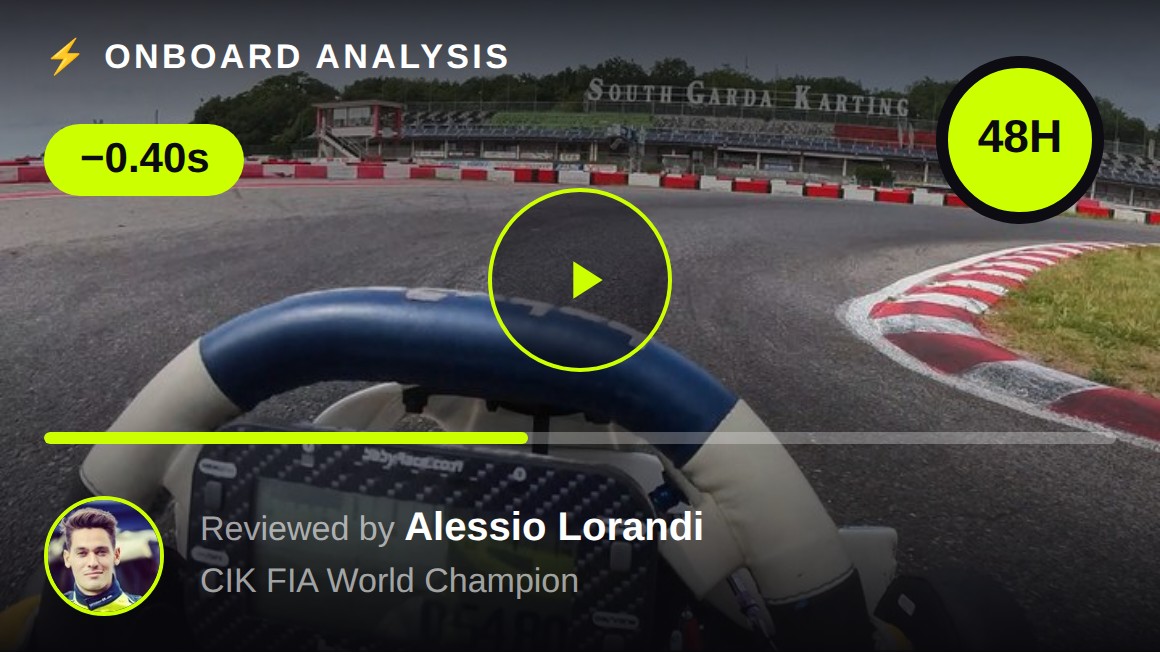
Send your onboard footage. Alessio reviews it corner-by-corner and tells you exactly what's costing you time, and how to fix it. Back within 48 hours.
Get My Onboard Reviewed → Reviewed personally by a CIK FIA World Champion, never an assistant.I promise I'll not spam you with repurposed shitty AI content but real experiences that only I, Alessio Lorandi, experienced. Written in my funny English-Italian tone of voice 😂
Alessio Lorandi is the former CIK FIA World Junior Champion, winning against Lando Norris in 2013 & F3 multiple race winner. He's helped 200+ karting drivers worldwide get faster & win WSK titles with BabyRace Driver Academy & now through Senndit, his online karting coaching platform.